 Clearlane
Clearlane Gantt
Who does what, and when?
Clearlane Gantt puts your Jira work on one clear timeline you can plan by hand: drag, stretch, link. It tells you in plain words when the plan does not add up.
How it works
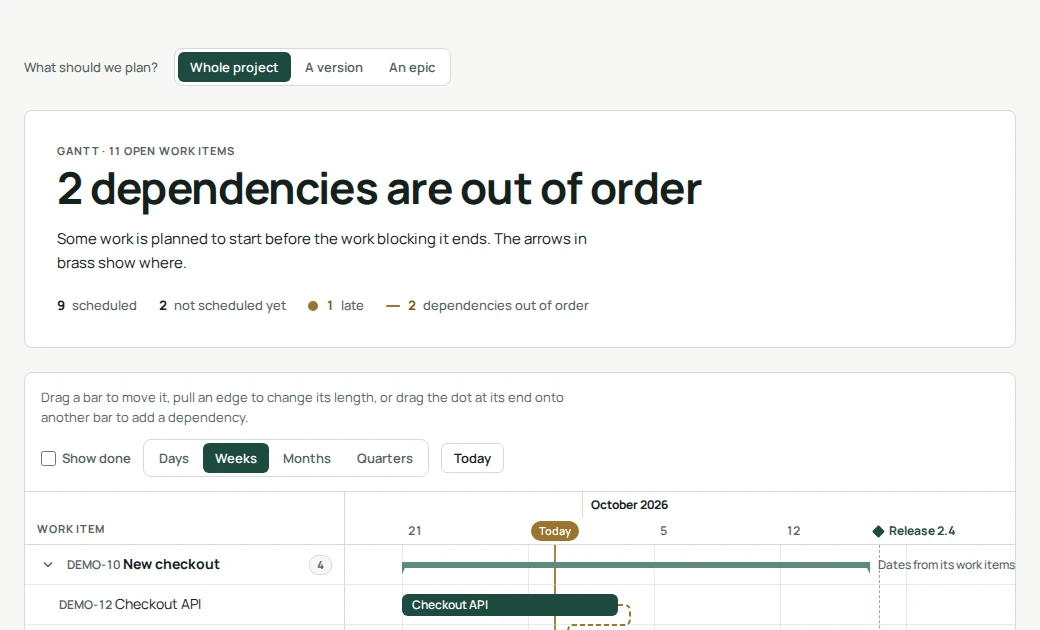
Each work item is a bar from its Start date to its Due date, the two fields Jira already has. Epics group their work items, and when an epic has no dates of its own, Gantt shows the span of its work. Changes are saved straight into those fields, so your boards, filters and reports stay in step.
Planning by hand
- Move: drag a bar. Stretch: pull its left or right edge.
- Schedule: click the empty lane of a work item that has no dates yet.
- Link: drag the dot at the end of a bar onto another bar. Jira records that the first one blocks the second.
- Undo: every change can be undone from the message that confirms it.
- Keyboard: arrow keys move a bar by a day, Shift and arrow keys change its end.
What it checks for you
- Clashes: work planned to start before the work blocking it ends. The arrow turns brass; click it to move the blocked work right after its blocker.
- Late work: open work whose end date has passed.
- Releases: your versions’ release dates appear on the timeline.
Permissions and data
Gantt reads and changes work items with the permissions of the person using it: changing dates needs the right to edit and schedule work items, adding a dependency needs the right to link them. It keeps nothing of its own and sends nothing outside your Atlassian site.
- Where do I find it?
- Open any project in Jira and choose Clearlane Gantt in the project sidebar.
- Jira refused a date. Why?
- The Start date or Due date field is not on that work type’s edit screen. Add it in the project settings and try again.
- Does it work on Jira Free and Standard?
- Yes. Clearlane Gantt uses the standard Start date and Due date fields, available on every Jira Cloud plan.