 Clearlane
Clearlane Pulse
Which work is stuck?
Pulse shows every work item in progress, how long it has been running, and whether that is normal for your team.
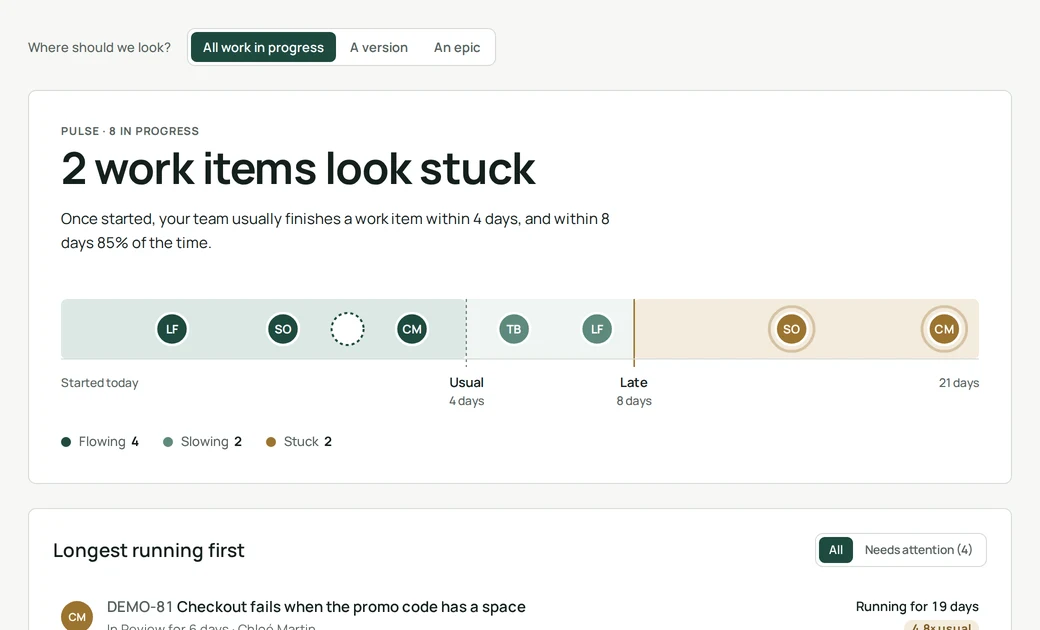
How it works
Pulse looks at the work items your project finished in the last 84 days and measures how long each one took, from the moment it first moved to an in-progress status until it was done. That gives your team’s usual pace. Every item still in progress is then compared with it.
Reading the lane
- Flowing: running for less time than half of your work items usually take.
- Slowing: longer than usual, but still within what 85% of your work items take.
- Stuck: running longer than 85% of your finished work items did. Worth a conversation.
What counts
Stories, tasks, bugs and other standard work items. Epics and subtasks are left out. You can look at the whole project, a single version or a single epic.
Permissions and data
Pulse only reads your Jira work and its status history, with the permissions of the person looking at the page. It stores nothing and sends nothing outside your Atlassian site.
- Where do I find it?
- Open any project in Jira and choose Clearlane Pulse in the project sidebar.
- Why does it ask for more history?
- Pulse needs at least five work items finished in the last twelve weeks, each having passed through an in-progress status. Until then it still lists what is running, and for how long.
- An item is stuck on purpose. Is that a problem?
- No. Pulse does not judge; it points at what has been running longer than usual so the team can decide.