 Clearlane
Who approved this, and is it still the approved version?
Controlled Documents turns any Confluence page into a controlled document: approvals with electronic signatures, read confirmations for every revision, periodic reviews, and an evidence file your auditor can read.
How it works
Open a page and choose Document control under its title. The page gets a number, such as SOP-0012, and moves through four states: Draft, In review, Effective and Obsolete. The owner sends it for approval, each approver signs, and when the last signature is in, the revision becomes effective.
Signatures bound to the exact content
- Each signature records the signer’s name, the date and time, and its meaning: Authored, Reviewed or Approved.
- Signers confirm with a personal signing password on top of their Atlassian login. Repeated failures lock signing for that person for a while.
- Each signature carries a SHA-256 fingerprint of the page as it was approved. Any edit during review cancels the signatures collected so far.
- If an effective document is edited later, it is flagged “Edited since approval”, with a link to the approved revision and a comparison.
- Editing can be locked during review. The app only adds restrictions; it never removes the ones you already have.
Read and understood, per revision
Choose the people and groups who must read a document. They confirm each effective revision, and a new revision asks them again. Reading progress shows on the page and in the register, and exports to CSV for training records.
A register for the whole space
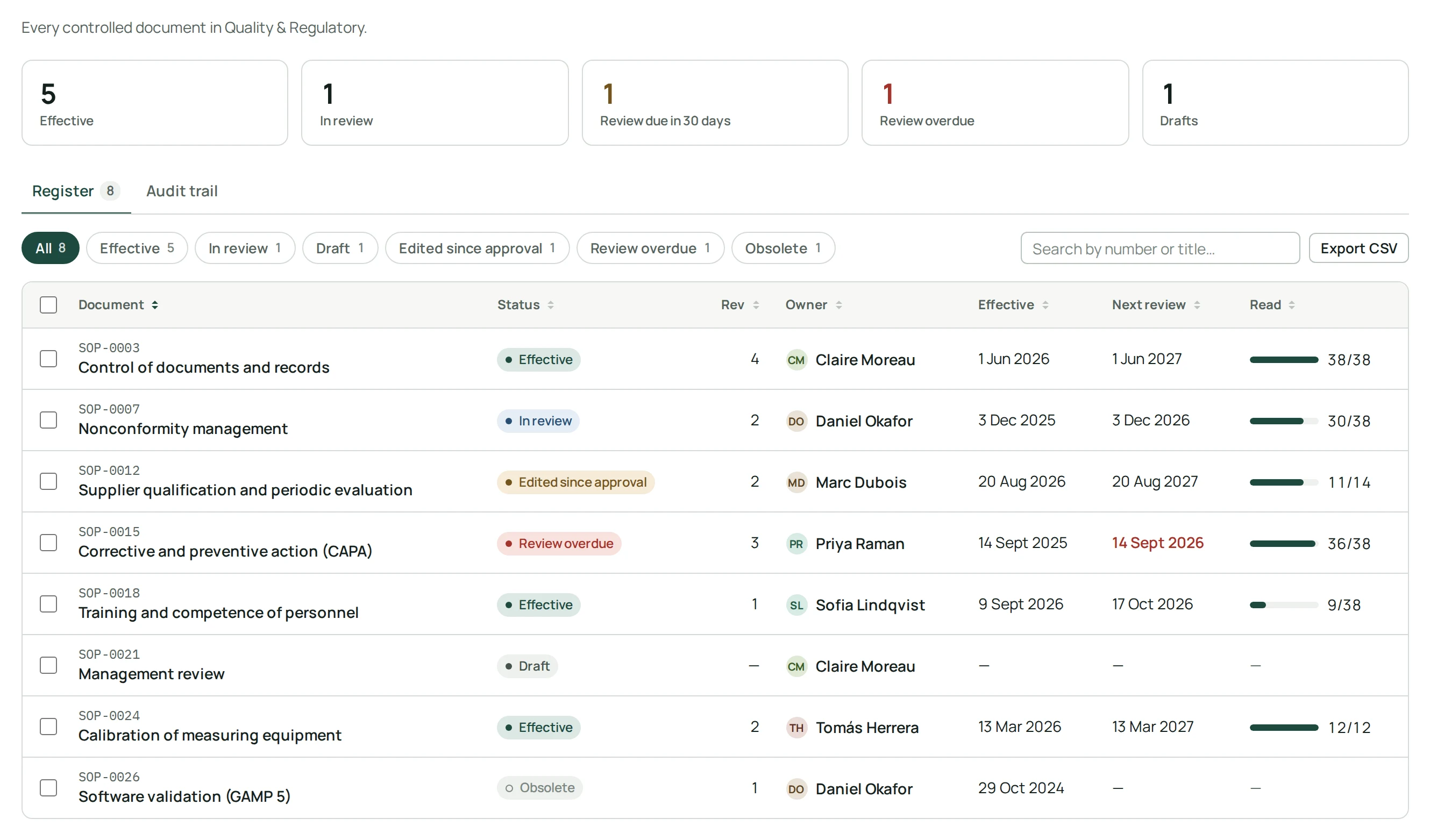
- Every controlled document of a space in one table: status, revision, owner, effective date, next review and reading progress.
- Filters for “In review”, “Edited since approval” or “Review overdue”, and export to CSV.
- Periodic reviews: when a review is overdue, the owner gets a weekly reminder on the page.
- “My controlled documents” lists what each person has to sign, read or review.
- An audit trail of every action in the space, for space administrators.
The evidence file in one click
Download a PDF with the signature manifest, the revision history, the read confirmations and the audit trail of a document. Add the document control block to a page, and its number, revision and signatures also appear in Confluence’s own PDF exports.
For regulated teams
Controlled Documents is designed to help teams meet the document control requirements of FDA 21 CFR Part 11, ISO 9001 and ISO 13485. Validating your system for your own intended use remains your responsibility.
Permissions and data
The app runs on Atlassian Forge (Runs on Atlassian). It keeps the document records it needs, such as Atlassian account IDs, the names shown at signing, revisions, fingerprints and the audit trail, in Atlassian’s storage for your site. Signing passwords are stored hashed, never in clear text, in Atlassian’s secret storage. Nothing is sent to our servers or to anyone else.
- Where do I find it?
- On any Confluence page, choose Document control under the page title. The space register is in the space’s apps, and “My controlled documents” in Confluence’s apps menu.
- Can someone approve without reading the final version?
- No. A signature applies to the exact content fingerprinted when it was given. If the page changes during review, the signatures are cancelled and approvers sign again.
- Does it work in French?
- Yes. The app follows each person’s Confluence language, in English or French, in light and dark themes.