Gantt, time in status and reports in Jira. No Jira plan upgrade needed.
Clearlane Delivery gives a team lead or a PMO everything to run a team in Jira, in one simple app: a Gantt chart with milestones, time in status and stuck work, Monte Carlo finish dates, project budgets and eight dashboard gadgets. It reads your Jira data, so there is nothing to migrate.
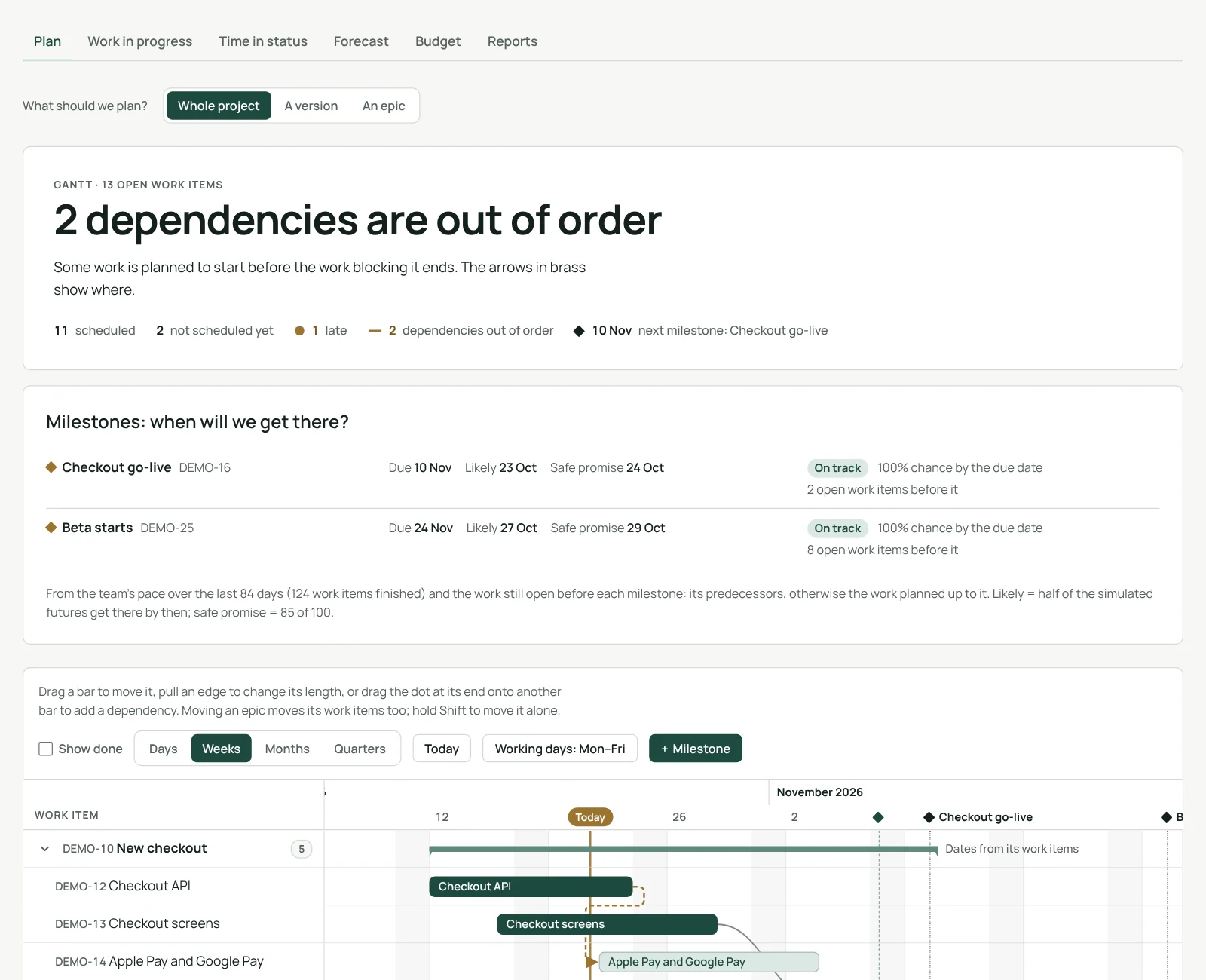
Plan on a Gantt chart, with likely milestone dates.
Drag a bar to move it, pull an edge to change its length, drag its dot onto another bar to add a dependency. Add milestones and set your working days. Each open milestone shows the date it will likely be reached, the date you can safely promise and its chance of making the due date, from your team’s real pace.
- Dependencies out of order and late work shown in brass
- A whole project, a version or an epic; days, weeks, months or quarters
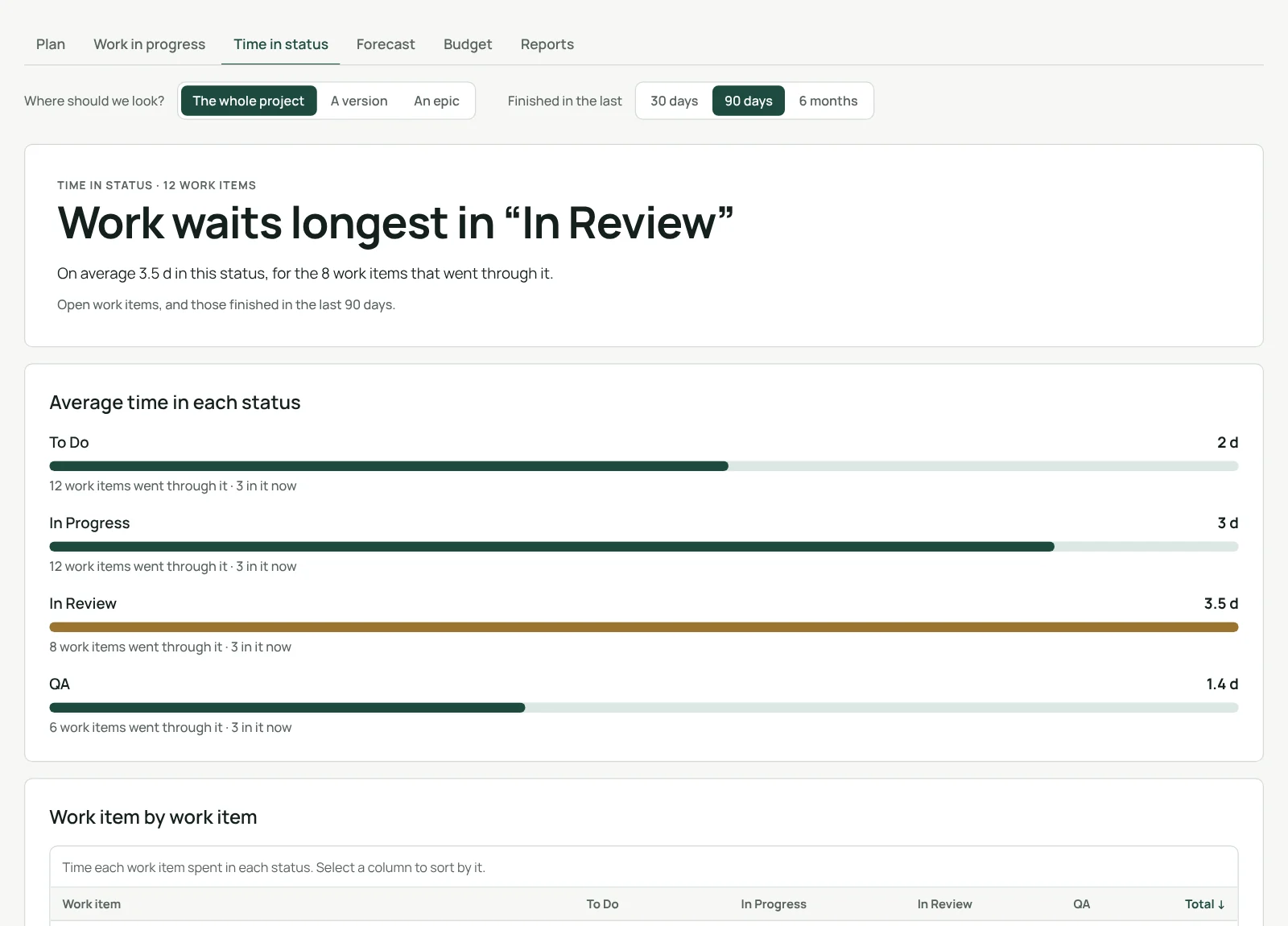
Time in status, for every work item.
See where work waits: the average time in each status, the slowest status, and work item by work item the time spent in each one. For a project, a version or an epic, over the last 30 days, 90 days or 6 months. Read from Jira’s history: nothing is copied.
- Sort by any status or by the total
- Open work items, and those finished in the period
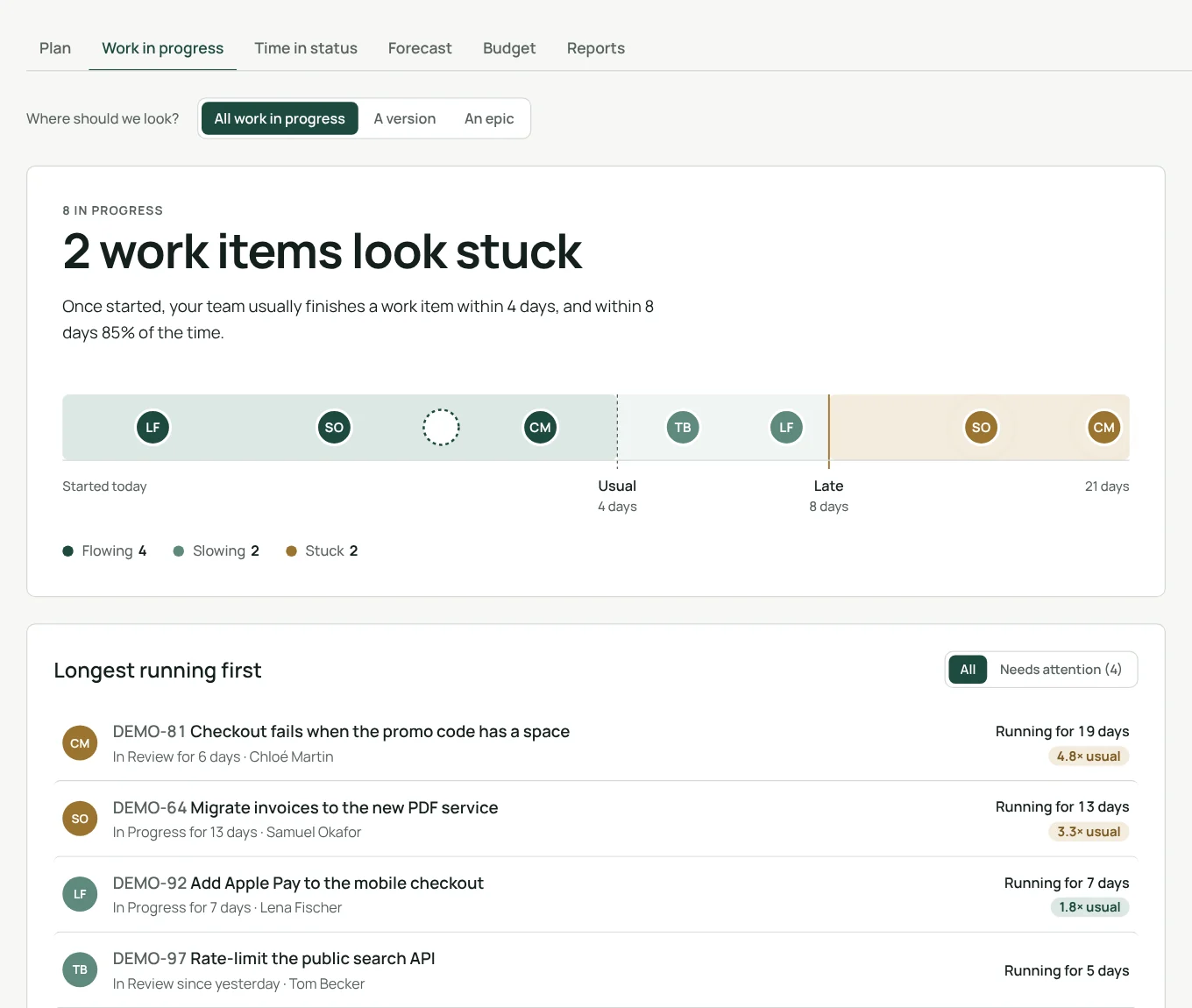
Spot stuck work before it is late.
How long each work item has been in progress, against the pace your team usually keeps. Work that runs longer than usual is flagged before anyone has to ask.
Finish dates and budgets you can stand behind.
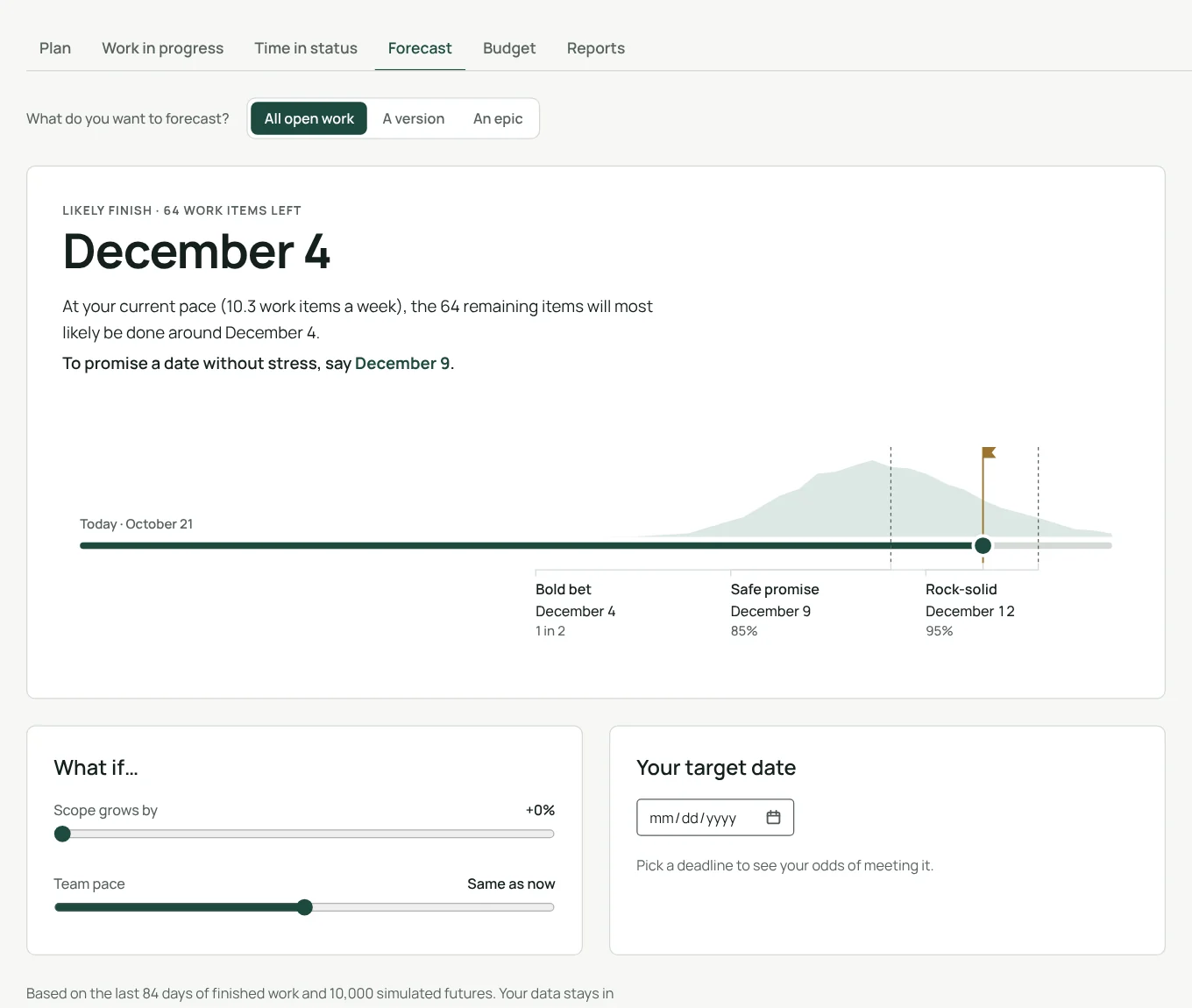
Monte Carlo forecasts for all open work, a version or an epic: the likely date and the date to promise, with what-ifs on scope and pace. Budgets compare logged time and expenses with each budget and show the likely final cost.
- 10,000 simulated futures from the last 84 days of finished work
- Budgets by cost, billable value or hours, and a portfolio across projects
Eight gadgets for your Jira dashboards.
Flow
Created vs resolved, throughput and cumulative flow: is the work growing, how much is finished, is it piling up?
Sprints
Sprint burndown and velocity: will the sprint finish on time, how much does the team deliver?
Pace
WIP aging, cycle time, and a burnup with its likely finish date.
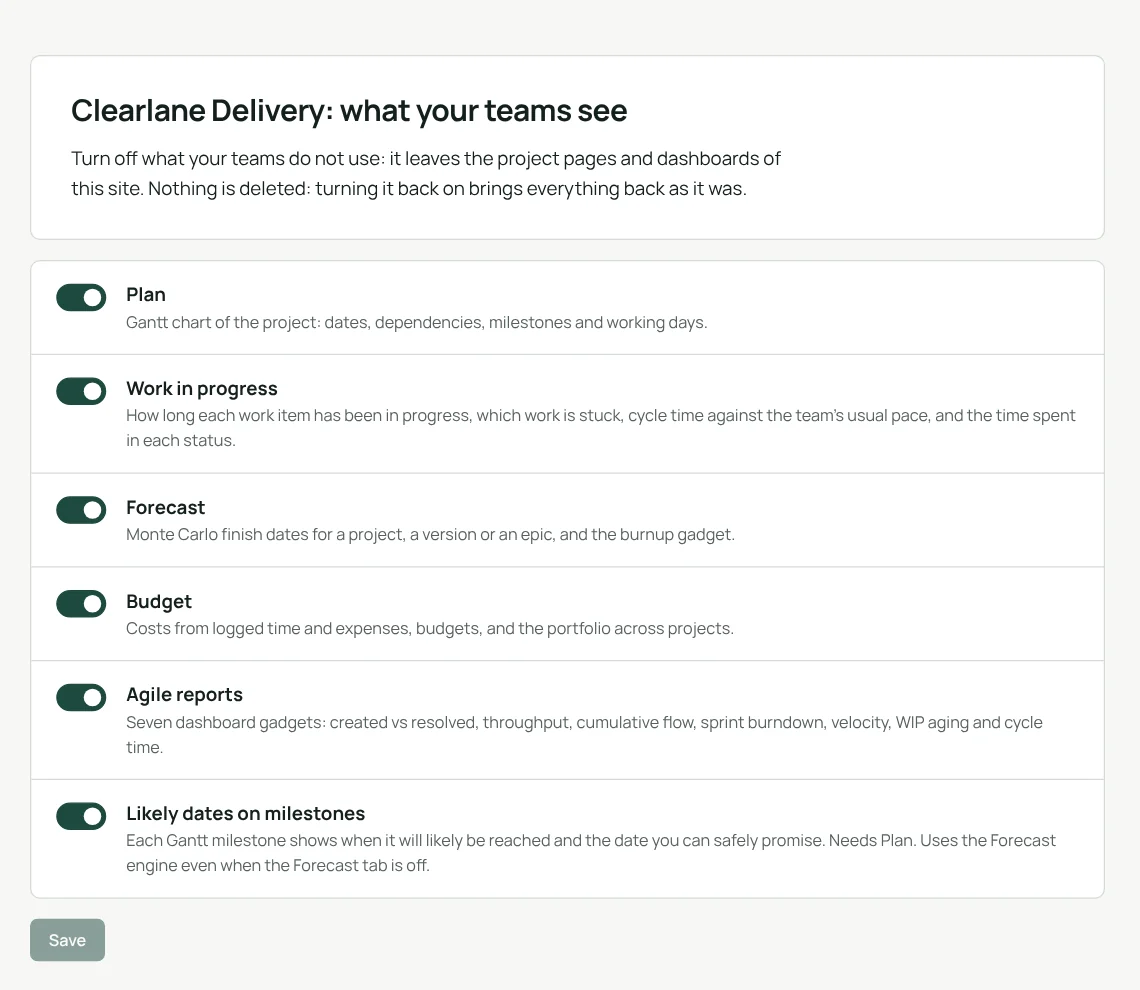
Turn on only what your teams use.
A Jira admin switches each part on or off in the app’s settings. Turning a part off removes it from project pages and dashboards; nothing is deleted, and turning it back on brings everything back as it was.
Nothing to migrate
It reads the work items, dates, links, statuses and worklogs already in Jira.
One part, one tab
Plan, Work in progress, Time in status, Forecast, Budget and Reports.
Your permissions
Everyone sees only the work items they can see in Jira.
Your language
English, French or German, light and dark theme, as in Jira.
From install to the first plan in minutes.
- Install itfrom the Atlassian Marketplace, for the whole Jira site.
- Open a projectand choose Clearlane Delivery in the project’s apps menu.
- Add gadgetsto any dashboard: search for “Clearlane Delivery”.
Permissions and data
The app runs on Atlassian Forge (Runs on Atlassian) and reads Jira with the permissions of the person using it: you see only the work items you can see in Jira. Dates, dependencies and milestones you change on the Gantt chart are written to Jira as you, with your permissions.
Each part keeps in Atlassian’s Forge storage for your site exactly what the matching single Clearlane app keeps: Plan and Forecast only hourly usage counters, Work in progress and the gadgets short-lived caches (less than 24 hours, without account IDs), Budget its budgets, rates, expenses and the account IDs of the people a budget names. Delivery adds the parts a Jira admin turned on and its own hourly usage counters, with salted one-way marks instead of account IDs. Nothing is sent to our servers.
Questions, answered.
- Do I need Jira Premium?
- No. Clearlane Delivery works on every Jira Cloud plan, Standard included. It does not use Jira’s own advanced planning.
- Where do I find it?
- In each Jira project, as the Clearlane Delivery project page with its tabs; the budget portfolio in Jira’s Apps menu; and its gadgets on any Jira dashboard.
- Who changes the settings?
- Jira administrators, in Apps › Manage apps › Clearlane Delivery › Configure. Budgets are created by Jira administrators and the budget managers they name.
- Do I have to copy my data?
- No. It reads the work items, dates, links, statuses and worklogs already in Jira.
- Which languages?
- The app follows each person’s Jira language, in English, French or German, and Jira’s light or dark theme.
Built and supported by Maxime Ragionieri, founder of Clearlane. Who’s behind Clearlane →
Free for up to 10 users.
Larger teams pay per user, billed by Atlassian on the Marketplace. No setup, nothing to install outside your Atlassian site. See the price for your team size →