 Clearlane
Where will this budget land?
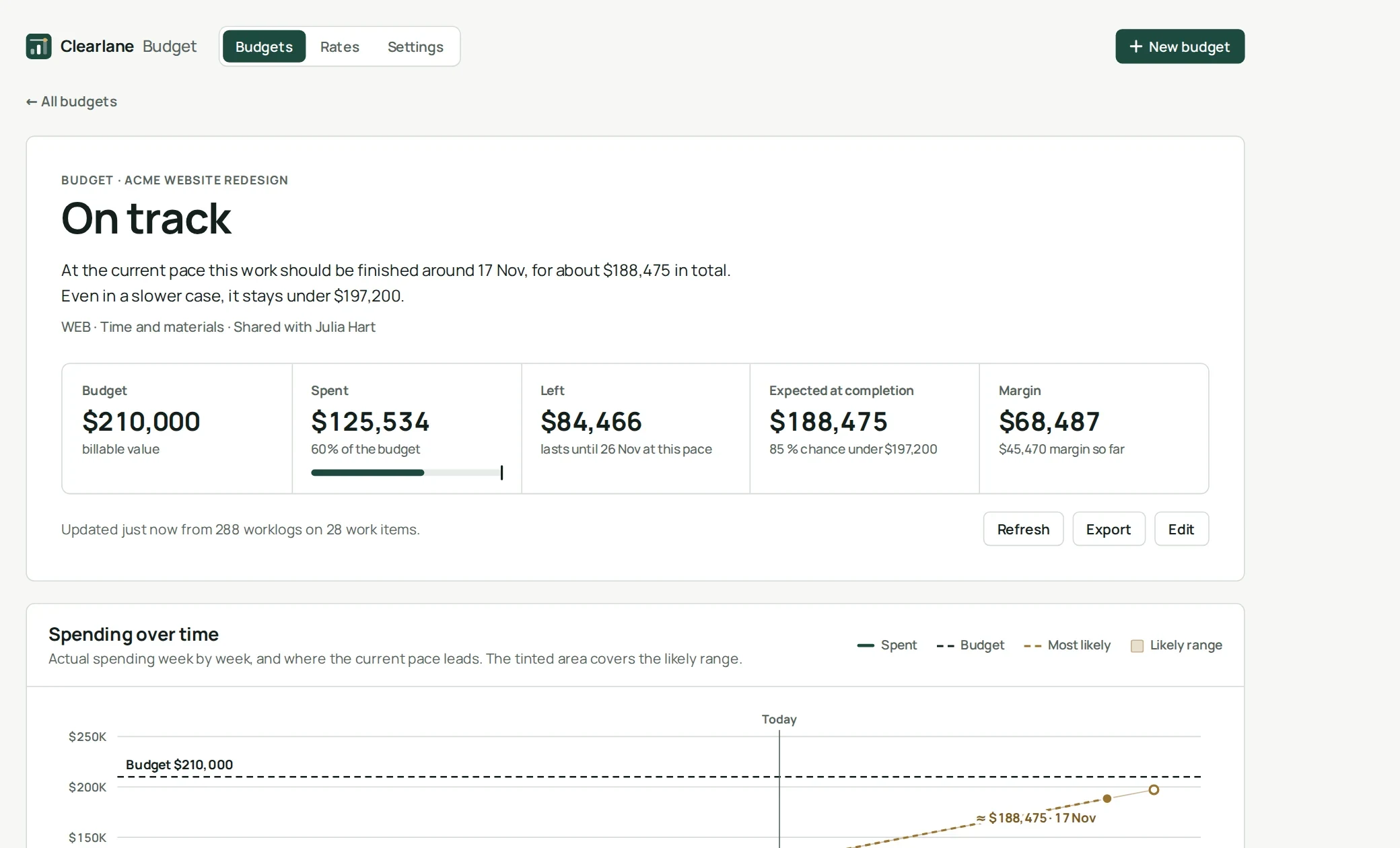
Clearlane Budget turns the time your team already logs in Jira into project budgets: what has been spent, what is left, the margin, and the likely final cost before it happens.
How it works
Create a budget for one or more projects, and narrow it with any JQL if you like: an epic, a version, a label, a client. Choose an amount in money or in hours. The app reads the worklogs of those work items and applies your rates. There is nothing to log twice.
Works with the time tracking you already use
Clearlane Budget reads Jira’s own worklogs. Time logged in Jira, and by time tracking apps that write Jira worklogs, counts without any extra setup.
The final cost, before the invoice
- Each week of the recent past is a sample: how much work was finished and how much was spent. The app replays thousands of possible futures from those weeks.
- You get the most likely final cost and date, and a figure you have an 85 % chance to stay under.
- One sentence says it all: on track, at risk, heading over by 6 %, or over budget.
- At the current pace, you also see the day the budget runs out.
Internal, time and materials or fixed price
- Internal: follow what the work costs you.
- Time and materials: billable hours at bill rates, revenue and margin. Label non-billable work and it never counts as billable.
- Fixed price: enter the agreed price and watch the margin left.
- Add expenses such as licences, travel or subcontracting, billable or not.
Rates with history
Set a cost rate and a bill rate for each person, with the date each change starts, plus default rates for everyone else. A budget can use its own bill rates for one client. Change a rate and every budget is recalculated at once.
Ready for invoicing
- Breakdowns by person, by epic and by month, with sub-tasks rolled up to their epic.
- Export every time entry with its rate and amount to Excel, in English or in French format.
- All budgets on one page, each with its status and its forecast.
Who sees what
Jira administrators and the budget managers they name create budgets and set rates. Each budget can be shared with people or groups, who see its figures but never the rate card. A manager can only budget projects they can browse in Jira.
Permissions and data
The app runs on Atlassian Forge (Runs on Atlassian). It reads work items and worklogs of the budgeted projects with the app’s own access, so a budget shows the same figures to everyone allowed to see it. Budgets, rates, settings and computed figures, including the Atlassian account IDs and names of people who logged time, are kept in Atlassian’s storage for your site. Nothing is sent to our servers or to anyone else.
- Where do I find it?
- In Jira’s apps menu for all budgets, and in each project’s sidebar for the budgets of that project.
- How fresh are the figures?
- A budget is brought up to date when someone opens it after an hour, and at any time with Refresh. Rate changes apply instantly.
- Does it work in French?
- Yes. The app follows each person’s Jira language, in English or French, in light and dark themes.